Installing Nvidia Drivers on Ubuntu - The Easy Way
I had installed Nvidia Drivers on my Desktop using ubuntu-drivers --autoinstall thinking that everything should work properly. But turns out I was wrong. It had weird issues, and I was not able to use the Nvidia Encoder in OBS either. So, this is what I had to do to get everything fixed.
Step 1 - Remove any old drivers
Step 1.1 If they were installed through the PPA
That is, if you installed the drivers using apt
Linux : NFS not mounting on boot even with fstab entry
If you have come across a problem where you had an entry for an NFS server on any systemd system, and it is not mounting those at boot, but it mounts when issuing a sudo mount -a I have a solution for you
The Fix
Update your fstab entry by editing /etc/fstab and adding these options.
server IP:/share_path /mountpoint/on/client nfs _netdev,noauto,x-systemd.automount,x-systemd.mount-timeout=10,timeo=14,x-systemd.idle-timeout=1min 0 0A practical example
192.168.40.100:/volume1/Media /nas/media nfs _netdev,noauto,x-systemd.automount,x-systemd.mount-timeout=10,timeo=14,x-systemd.idle-timeout=1min 0 0This should be it
Fix Immich Server Status Offline
Immich is an amazing self hosted photo management system, I cannot recommend this one enough.
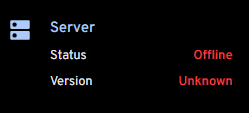
If you use Immich behind Nginx Proxy Manager, and if you are seeing that within Immich, the Server Status is offline as shown below
The solution is very easy. Just go to the Nginx Proxy Manager for the Immich domain and enable Web Socket support
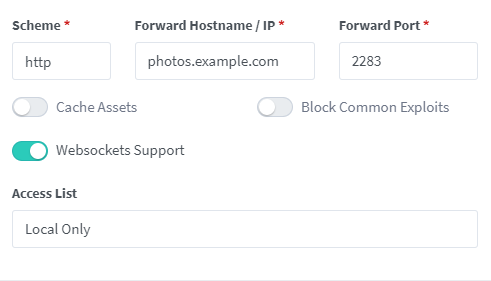
That's it! Once that is done, you should be able to see the proper status
How to install sudo on Windows 11
This post is from February 2024; sudo is no longer limited to Insider Preview. It is available in Windows 11 version 24H2 and later, so the availability advice below is outdated.
No, this is not a troll post. Microsoft really did release sudo for Windows 11. Currently it is available only on Windows 11 Insider Preview Build 26052
So, if you do not want to go through the hassle of getting insider preview builds, just wait a little bit longer.
How to fix Samsung Galaxy low Bluetooth headphones volume
Have you ever paired your Bluetooth headphones with your Samsung Galaxy S23/S24 Ultra or regular (and potentially other Samsung Galaxy devices), only to find the volume disappointingly low, even at maximum settings? This issue is pretty common and I have been scratching my head.
Fortunately, there's a simple fix within the device's settings that can help enhance your audio experience significantly. This guide will walk you through the steps to resolve low Bluetooth headphone volume on your Galaxy S23 by adjusting the "Disable absolute volume" option.
How to combine multiple mp4 files easily using ffmpeg
Combining multiple MP4 files into a single file using FFmpeg is quite straightforward. However, it's important to note that for a seamless combination, the MP4 files should have the same resolution, frame rate, and codec parameters. If they differ, you might need to preprocess them to match these properties before combining (read step 4).
Step 1: Install FFmpeg
You can install FFmpeg for your operating system by following instructions HERE
Step 2: Create a file list
Create a text file that lists all the MP4 files you want to combine, one file per line, prefixed with file . For example, save the following as filelist.txt:
How to install FFmpeg (Linux/Mac/Windows)
Installing FFmpeg varies vastly depending on your operating system of choice. In this post, I will show you how you can easily install FFmpeg on any operating system
Windows
Step 1: Downloading the executable
- Easiest way to install FFmpeg on windows is to go HERE and download the latest
.exe - An Example link would be THIS
- Extract the downloaded file and copy it to somewhere like
C:\ffmpeg(you should rename the extracted folder toffmpeg)
Step 2: Updating the PATH
- Open a command prompt as the administrator and run the following
setx /m PATH "C:\ffmpeg\bin;%PATH%"
This will add the C:\ffmpeg\bin to your PATH variable, which means you should be able to run ffmpeg from anywhere on your command prompt
Best way to monitor GPU usage in Linux (AMD/Nvidia/Intel)
I have been trying to find a good tool to monitor the Linux GPU usage and so far nvtop is my favorite
What is nvtop?
nvtop stands for NVIDIA Top, but don't let the name fool you. It's a versatile tool that provides a comprehensive overview of GPU usage across different brands, not just NVIDIA. Think of it as the htop of the GPU world – an interactive monitor that displays the utilization of GPU resources in a clear, accessible manner.
How to import WireGuard VPN configuration on Linux (nmcli)
Introduction
So, you've just signed up for a VPN service, and they've provided you with a WireGuard configuration, or perhaps you've set up your own WireGuard VPN server and have the configuration ready. You're looking to import this configuration into your system without the hassle of third-party VPN clients. Fortunately, for Linux users, there's a streamlined way to achieve this using the NetworkManager's command-line interface, nmcli. This tool not only simplifies network management tasks but also supports importing WireGuard configurations directly, making your VPN setup quick and straightforward. In this blog post, we'll walk you through the process of importing your WireGuard VPN configuration using nmcli, ensuring you can establish a secure and private connection in no time.
How to fix Ruby error : OpenSSL is not available (Mac)
This post is from July 2023; its OpenSSL 1.1 and Ruby 3.0 instructions are outdated. OpenSSL 1.1 is no longer supported; check current Ruby and Homebrew guidance instead.
The Error
This is the error that you may get while installing a gem using gem install or bundle install.
ERROR:  While executing gem ... (Gem::Exception)
    OpenSSL is not available. Install OpenSSL and rebuild Ruby (preferred) or use non-HTTPS sources
I have seen this error in M1 Macs and the issue is due to ruby not having OpenSSL support compiled into it